Skip to product information
ANYCUBIC3D-US
Free Express Shipping
ANYCUBIC3D-US
14-Day No Reason Return
ANYCUBIC3D-US
30-Day After-Sales Guarantee
ANYCUBIC3D-US
1-Year Warranty For 3D Printers
New

PVA

Regular price $37.99
Sale price $37.99 Regular price $49.39
Save $11.40

Tax excluded. Actual tax rate varies by region.

4 interest-free payments of ... with
Afterpay
Klarna
Affirm

Product Features
● Water-Soluble
● Strong Adhesion
● Effortless Support Removal
● RFID Recognition

Color: Natural (#EFF4A4)
Size: 0.5KG
ANYCUBIC3D-US
Estimated Shipping Time
Ships in 24 hours
All Colors
View More
ANYCUBIC3D-US
Payment Methods
ClearpayMastercard Visa American Express PayPalDiscoverKlarnaUnion PayAfterpayDiners Club
ANYCUBIC3D-US
Delivery Method
ANYCUBIC3D-US ANYCUBIC3D-US ANYCUBIC3D-US
ANYCUBIC3D-US
Free Express Shipping
ANYCUBIC3D-US
14-Day No Reason Return
ANYCUBIC3D-US
30-Day After-Sales Guarantee
ANYCUBIC3D-US
1-Year Warranty For 3D Printers
Regular price $37.99
Sale price $37.99 Regular price $49.39
Features File Download Precautions Specification Color Type Reviews FAQs
Regular price $37.99
Sale price $37.99 Regular price $49.39
Add to cart
ANYCUBIC3D-USANYCUBIC3D-US

Anycubic PVA Filament

Water-Soluble | Reliable Adhesion | Dissolve Thoroughly | Effortless Support Removal | Filament Intelligent Identification

Truly Effortless Support Removal

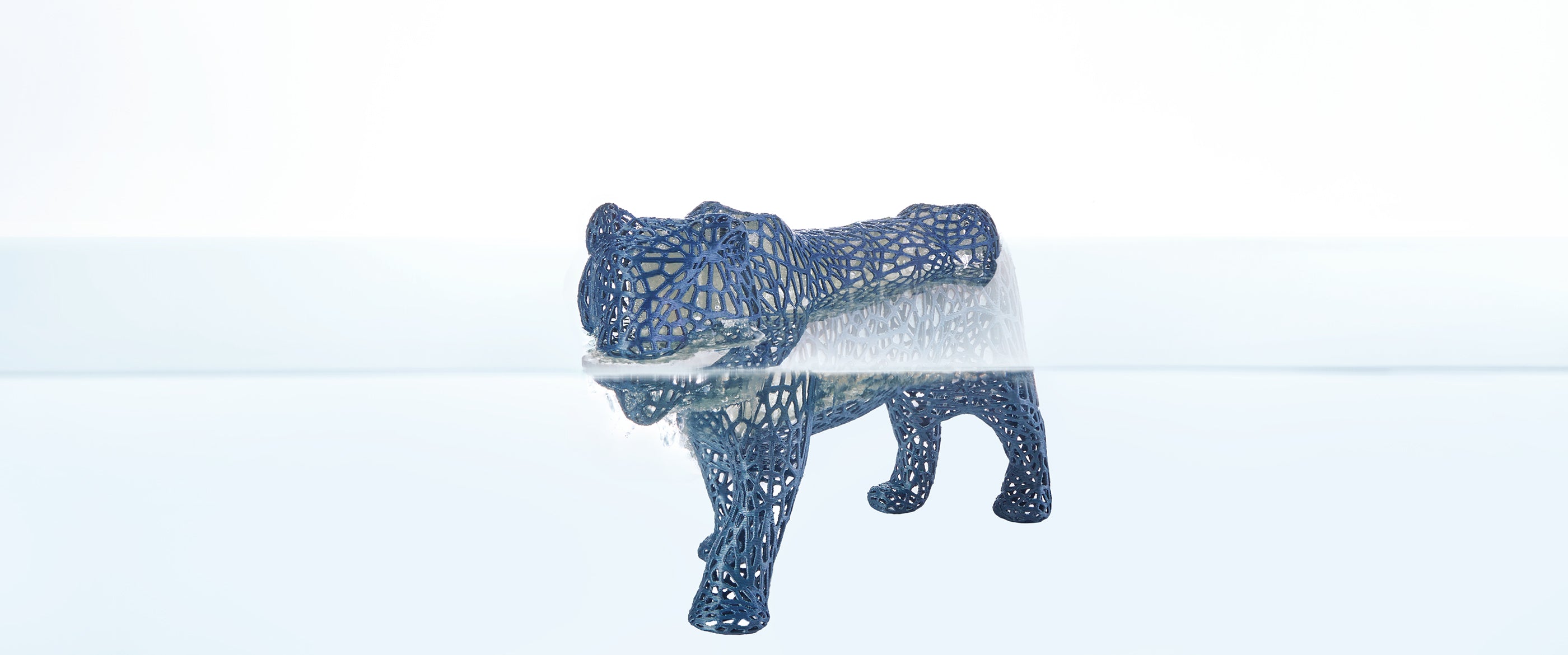
Anycubic PVA is a water-soluble support material specially engineered for intricate designs and steep overhangs. Because it dissolves completely in water, you can skip the tedious manual support removal and protect your print's finest details.

ANYCUBIC3D-US
ANYCUBIC3D-US

Preserving the Finest Detail

Anycubic PVA is 100% water-soluble, delivering a hands-off post-processing experience. By submerging the print, supports dissolve cleanly from complex internals, ball joints, and fine details that manual removal would ruin. The result is a smooth, precise surface that requires zero sanding or polishing.

*The higher the water temperature and the greater the water volume, the faster and more thorough the dissolution.

ANYCUBIC3D-US
ANYCUBIC3D-US

Improved Printing Success Rates

Anycubic PVA is a reliable support material for various filaments such as PLA, PETG, and TPU. Increase print success rates by providing reliable adhesion and solid support structures during printing.

ANYCUBIC3D-US
ANYCUBIC3D-US

Moisture Control Packaging

Because PVA is highly hygroscopic, Anycubic PVA arrives vacuum-sealed in high-barrier aluminum foil packaging with a dedicated anti-moisture seal. This protection completely isolates the filament from environmental humidity, ensuring optimal shelf life and out-of-the-box performance.

Filament Intelligent Identification

Integrated chips enable instant filament identification and automatic preset loading, delivering a streamlined printing experience.

Note: Requires an internet connection and is compatible exclusively with Anycubic printers.

Reusable Filament Spool

The reusable filament spool incorporates a threaded connection system engineered for enhanced stability when paired with spool-free filaments. This design significantly reduces the risk of entanglement, filament scattering, and operational errors.

*You can keep the spool for future use - saving costs and minimizing waste with every refill.

Filament Installation

ANYCUBIC3D-US

1. Label the Filament

Remove both stickers and both chips. (if present.) Install new chip stickers onto both flanges.
ANYCUBIC3D-US

2. Load the Filament

Open the spool, align the filament with the latch, and snap it into place.
ANYCUBIC3D-US

3. Locking the Spool

Close the spool, press firmly, and rotate until you hear a “click," confirming it's locked.
ANYCUBIC3D-US

4. Prepare the Filament

Once the spool is locked, remove the bonding strap and thread the filament into the spool hole.

Precautions

  1. When opening PVA for the first time, it is recommended to use it with the ACE 2 Pro for simultaneous drying and printing. Otherwise, it may easily absorb moisture and lead to print failure. If the ACE 2 Pro is not available, the PVA must be printed in a sealed, dry environment (such as a dry box or sealed aluminum foil bag).
  2. After use, PVA must be stored in a sealed, moisture-proof container (aluminum foil bag / dry box) and thoroughly dried before the next print. Recommended drying conditions: 80°C in a forced-air dryer for 8–12 hours; or on a printer heated bed at 90–100°C for approximately 12 hours (flip halfway through). ‌Caution:‌ Do not exceed 100°C to avoid deformation or damage to the spool.
  3. PVA in a dry state is suitable for use with the ACE 2 Pro. If the filament becomes soft and sticky after absorbing moisture, it must be re-dried before use. Otherwise, it may cause feeding failures, nozzle clogging, and poor print quality.
  4. The higher the soaking water temperature, the faster the PVA dissolves (when used as PLA support, the soaking water temperature must be ≤50°C to prevent deformation of the main print). It can be removed when partially dissolved — complete dissolution is not necessary, reducing waiting time.
  5. After prolonged storage, or multiple or extended drying and storage cycles, it is normal for the color of PVA to change. This does not affect printing or support performance, and it can be used with confidence.
  6. PVA can be used as support in two ways: ① as the support + support interface; ② as the support interface only. If used as the support body: tree supports are not recommended during slicing (prone to collapsing).

    Note:‌ When drying PVA filament, use a forced-air oven with even temperature distribution and a large capacity. Keep the filament away from direct heating elements. ‌Do not use‌ a microwave or household kitchen oven, as this may damage the filament, spool, or printed models.
Specification
Preparations

Dry Out Before Use

Required

Drying Condition

Convection oven 75-85 °C, 8-12 h

Heatbed Adhesive

Recommended

ACE Pro Multicolor System

Supported

Nozzle Size

Recommended 0.4 mm or above

Nozzle Material

All Nozzles
Printing Parameters

Printing Temperature

220-240 ℃

Heated Bed Temperature

35-65 ℃

Recommended Printing Speed

<200 mm/s

Maximum Volume Speed

/

Density

1.25 g/cm³

Melt Index

7.5±1 g/10 min (210 ℃/2.16 kg)

Heat Deflection Temperature (0.45MPa)

/

Saturated Water Absorption Rate

6.15±0.1%
Mechanical Properties

Young's Modulus

/

Tensile Strength

/

Elongation at Break

/

Bending Modulus

/

Bending Strength

/

lzod lmpact Strength (X-Y)

/

Tensile Strength (Z)

/
Filament Characteristic

Filament Type

Functional filament

Intelligent Identification

Supported

Reusable Filament Spool

Supported

Color Type

ColorHex CodeDisplay
Natural#EFF4A4

FAQs


What is PVA support material, and how is it different from regular support?

PVA is a water‑soluble support material designed for dual‑extrusion 3D printers. Unlike traditional supports, PVA supports dissolve completely in tap water after printing. This eliminates manual removal, protects delicate surfaces, and is ideal for overhangs, deep cavities, and intricate internal geometries.

Which printing materials are compatible with this PVA filament?

Our PVA filament adheres strongly to PLA and Nylon, and also works well with ABS, PETG, CPE, and many other common filaments. It serves as a reliable support partner for both everyday and professional projects.

How do I remove PVA supports? Do I need any special chemicals?

Not at all. Simply immerse your finished print in tap water. Warm water accelerates dissolution, but cold water also works effectively. No hazardous chemicals are required – it’s safe and environmentally friendly.

Is PVA filament prone to moisture absorption? How should I store it?

Yes, PVA is hygroscopic and sensitive to humidity. Store unused filament in its original sealed bag with desiccant. If you notice brittleness or bubbling during printing, the filament has absorbed moisture – dry it in a filament dryer before use.

What should I do if the filament I received has problems with quantity, color, or other problems?

If there are any problems with the filament you received, please contact our support team for answers

What should I do if my model keeps failing to print?

If you are unable to print or printing fails, please contact our support team for answers.